Skip to content
Marketplace · Coaching

Feedhaus. Built for academies that sell their knowledge as a system

Feedhaus is the template for social media academies, online courses and coaching programs with a fixed curriculum. 23 finished pages with eight levers as one continuous system, four platform strategies with a weekly plan drawn as an editorial calendar, nine templates with a topic filter and three programs with a monthly and yearly switch. Light periwinkle, navy panels, indigo as the only signal color, and calendar, comment thread, dashboard and phone are HTML instead of screenshots.

Explore the preview

For your own websites and client projects. Customize the project folder in your AI tool. Want us to handle the setup?

23 pagesFour weekly plans as calendarsEight levers with checklists
Portrait of ai-website.com Creator of this template ai-website.com
The story

Whoever sells a system has to show it before anyone pays

Read the full story

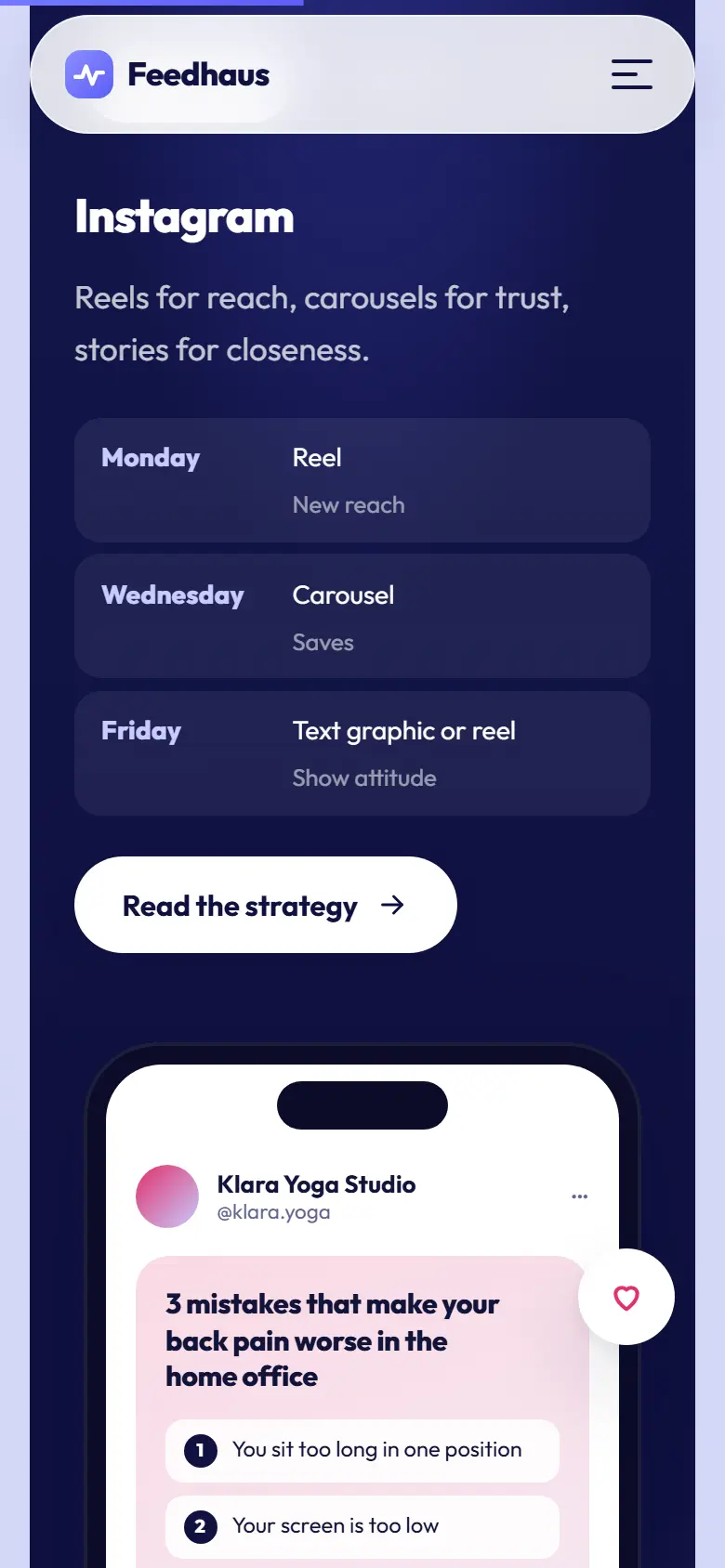
Feedhaus does not sell knowledge in chapters, it sells a routine. That is why every one of the four platform pages carries a weekly plan drawn as an editorial calendar: Monday a reel, Wednesday a carousel, Friday a text post, stories in between, and for YouTube a four-week cycle from research to review. The calendar is HTML, its entries come from one data row per platform, and next to it a phone mockup in the platform color shows what a post built on that plan looks like. The visitor sees the system before booking one of the three programs.

The eight levers run through the whole site. On the home page they are tiles, on the tips overview a twelve-week progress list with a topic filter, and every lever has a page of its own with a table of contents, a key sentence, a tickable checklist, one key figure and the matching templates from the resources. Together that is 58 minutes of reading and 32 checklist items, all of it text in a single file.

The design is light and friendly. Periwinkle as the page ground, navy panels for openings and bands, indigo as the only signal color, white and glass cards, plus five soft 3D icons in SVG floating above the openings. Editorial calendar, comment thread, analytics dashboard, notifications and phone are built from HTML and CSS, stay sharp at any resolution and can be rewritten for your own academy with a text editor.

finished pages
23
levers with their own page and checklist
8
weekly plans as editorial calendars
4
templates with a topic filter
9

Scroll through the homepage

The Feedhaus homepage travels as you scroll. Each stop explains why a section is built the way it is.

feedhaus.de
Full homepage of the Feedhaus template
  1. 01

    The opening in the navy panel

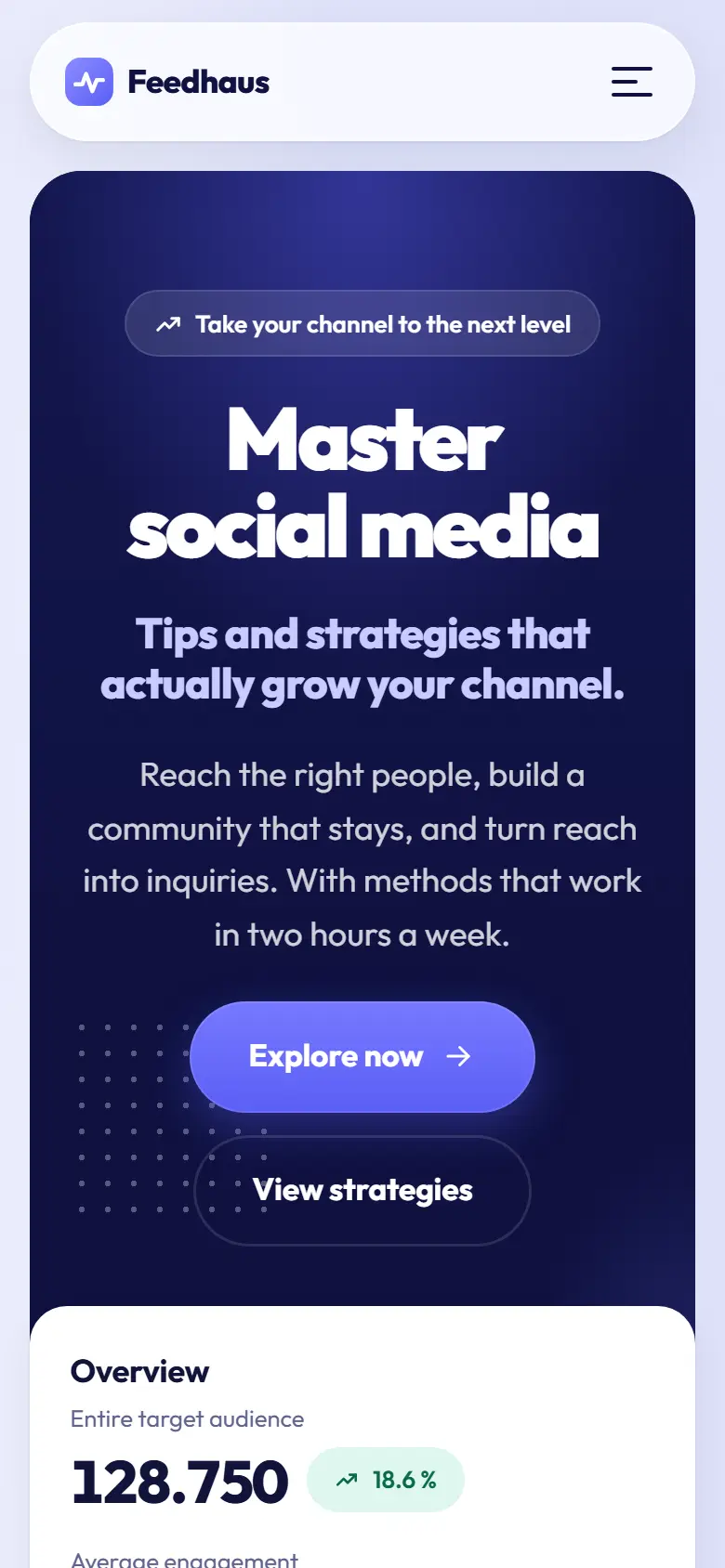
    A pill with the promise, a large headline, a subline, a lead and two buttons. A heart speech bubble and a thumbs-up float at the edges as 3D icons with parallax, and below them the analytics dashboard breaks out of the panel.

  2. 02

    Eight levers and a calendar

    A logo band with eight invented wordmarks, then the white block with the eight lever tiles. After that the week with a system as an editorial calendar next to three checkmarks and the link to the template.

  3. 03

    Bento and platform tabs

    Six tiles with a team photo, 400 coached channels, the production day, a quote, a bar chart and a rocket. Then the navy panel with four tabs, each with a weekly plan excerpt and a phone in the platform color, without leaving the page.

  4. 04

    Comment thread and three steps

    Lever 5 with a drawn comment thread and two notifications floating above it. Then the three-step process next to the analytics dashboard with twelve bars.

  5. 05

    Templates, numbers, voices, newsletter

    Three template cards, four key figures with an example note, three testimonials with monograms instead of photos, five questions as an accordion and the newsletter field with the bell. The form shows a success message, no server needed.

feedhaus.de Scroll to explore
Full homepage of the Feedhaus template, enlarged

Not one page. All of them

You are not buying a homepage full of promises, you are buying a complete website. Every subpage is fully designed and written.

1 / 7
Tips page of the Feedhaus template
Eight levers as a progress listGoal, audience, content, rhythm, community, formats, analytics, collaboration. The opening shows the twelve-week path with ticked stations, below it the topic filter, the recommended order, four myths and three testimonials.
Strategies page of the Feedhaus template
Four platforms in orbitInstagram, LinkedIn, TikTok and YouTube circle a 3D icon as badges. Below them four cards with image and key figures, a comparison table with rhythm, core format, time to effect, lifespan and effort, and four questions as a decision guide.
Resources page of the Feedhaus template
Nine templates with a filterEditorial plan, 40 hook formulas, profile checklist, analytics sheet, carousel layouts and more, filterable by topic in the browser. Plus three previews built in HTML: the calendar, four hook cards and the dashboard with three key figures.
Pricing page of the Feedhaus template
Three programs and the switchStart, Focus and Team at 29, 249 and 890 euros, a switch between monthly and yearly, a money-back guarantee and a comparison table with nine rows. The twelve-week schedule assigns two levers to each block, and four questions on cancellation and invoicing sit beside it as an accordion.
About page of the Feedhaus template
Four people, one timelineA team photo with a notification in the opening, four key figures, the story from 2019 to 2026 as a timeline, ten industries as pills, four portraits with focus and a sentence, four principles in glass cards and a bento on how the coaching works.
Contact page of the Feedhaus template
The form in a dark panelName, email, channel, topic as chips, message and consent, a success message without a backend. Next to it email, phone, address and a photo, below it the agenda of the first call, availability and the newsletter field.
FAQ page of the Feedhaus template
13 answers with live searchGetting started, programs, results, technology and privacy as groups with a counter. The search field filters as you type, an empty state catches searches without a match, and the three most-read levers close the page.
feedhaus.de Scroll to explore
The heart of it

The strategy sits on the page as a calendar, not as a paragraph

Every one of the four platform pages carries its own weekly plan. Instagram with a reel, a carousel and a text image on three days plus stories, LinkedIn with two posts, five comments a day and direct messages on Friday, TikTok with one video a day from five angles, YouTube as a four-week cycle from research to review. One component draws the plan as an editorial calendar with seven columns and colored entries, and next to it stands a phone mockup with a sample post in the platform color. It is the strongest surface of this template, and a new plan is one data row.

  1. One component, four plans

    The calendar takes a list of day, title and type. The platform page builds it from the weekly plan in the data, and one word in the format decides the color of the entry. Whoever adds Pinterest writes one entry in strategien.ts and gets a page, a tab, a comparison column and a calendar.

  2. The phone wears the platform color

    Instagram pink, LinkedIn blue, YouTube red, and TikTok gets indigo because black disappears on navy. Name, handle, hook, three numbered lines, likes and comments sit in the data, and two bubbles with a heart and a thumbs-up float beside it.

  3. The comparison keeps up

    On the overview the four plans sit side by side in a table with rhythm, core format, time to effect, lifespan and effort per week. Four questions as a decision guide point to the right platform, and a calendar for two platforms shows how a second one joins as a spin-off.

Strategies page of the Feedhaus template
4
weekly plans drawn as calendars
1
data row for a new platform
0
images in calendar and phone
Ready when you are

Make Feedhaus your next project

Buy the template and rebuild it yourself, or let us finish it for you together.

The template

The finished website, its knowledge and seven skills in one ZIP

All pages finished Seven skills CLAUDE.md + Knowledge
ai-website-template-feedhaus.zip Instant download
Buy directly
99 € 89 € one-time one-time, yours forever

An agency would bill four figures for a website like this.

  • The complete website, every subpage fully designed and written
  • Guideline and knowledge folder, so your AI understands the system
  • Seven skills that maintain and grow the site via chat
  • Docs and skills in English or German, your choice

You rebuild the project folder yourself, with a code editor and an AI tool like Claude Code. The documentation walks you through it.

Secure payment via Stripe, the ZIP arrives right after Made in Germany, built by web designers
Portrait of ai-website.com

Rather have it done for you? With the AI Website Service for €799 we build in your content and take you live. ai-website.com talks it through with you in the call.

Everything included Yours forever Adjustable via chat Made in Germany

All prices at a glance, template, service and custom

Who Feedhaus is built for

A template gets good by making choices. Feedhaus is tailored to one niche, and honest about where it does not fit.

Built for

  1. Social media academies, online courses and coaching programs with a fixed curriculum
  2. Consultants who show their knowledge as free guides and sell programs on the back of them
  3. Agencies with clients in education, coaching and the creator economy who want a light, friendly presence
  4. Founders of a membership or community who need course, templates and pricing on one site

Not meant for

  • One-on-one coaching with the coach at the center, Nordstett or Hellwach are built for that with a personal brand
  • Agencies without a course program, Kursfeld or Novardt are built for those
  • Software with a product demo, Konvara with its playable chat demo is built for that, and Voranto for dark AI automation

A different industry? Browse all templates

At home on the phone

More than half of all visitors arrive on a phone, in emergencies almost all of them. Feedhaus is built for that, not squeezed into it.

Mobile first. Layout, spacing and tap targets are made for thumbs.
Fast on weak networks. Statically built, free of heavy scripts and plugins.
Mobile entry screen of the Feedhaus template
The first screen
Mobile content section of the Feedhaus template
One section deeper

From ZIP to live website

Three steps. You need Node.js, an editor and one hour.

How your template works

Download the website with all its pages, design rules and seven skills as a project folder.

ai-website.zipYour complete project folder
Website
Design
Copy
SEO
Quality
Knowledge
Seven skills for working on your website.

Open the project in your AI tool. Describe the brand and offer, then review the changes.

You set the direction.
“Use my logo and my colours.”

Design rules applied

Your brand incorporated

Services added

Your sentence becomes a change.

Replace sample content, check desktop and mobile, and publish with your own hosting provider.

your-website.com
Your brand
Your business. Your website.Your offer.
Clear and to the point.
Get in touch
Your content. Your pages. Your code.
Illustrative workflow

More than a pretty surface

Feedhaus ships with its knowledge and skills, so your AI understands the website instead of guessing it apart.

Finished website. Every page of the niche, responsive, extremely fast and Google-friendly.
Guideline. The CLAUDE.md tells your AI how Feedhaus thinks, designs and writes.
Knowledge folder. The Knowledge folder bundles SEO strategy, tone of voice and the component map.
Seven skills. From SEO to quality assurance. Your AI maintains and grows the website via chat.
Yours forever. Pay once and the website, knowledge and skills are completely yours.
GDPR-friendly. Self-hosted fonts, no external CDNs, no tracking built in.

Quick answers

Yes. The structure is curriculum, paths, templates, team, pricing, contact and FAQ, and that holds for photography, bookkeeping or podcasting just the same. What is cut for social media are the eight levers, the four platforms and the HTML visuals such as the calendar and the phone. The copy sits in four data files, and the visuals can be kept, rewritten or removed. The start skill says up front how big the rebuild will be.

All eight sit in hebel.ts, one entry each with title, introduction, key sentence, sections, checklist and key figure. From that entry come the tile on the home page, the row in the progress list, the page of its own under /tipps/ and the references on the platform pages. Six modules instead of eight levers means six entries, and the progress ring and percentage calculate themselves. The copywriting skill writes the guides to your brief.

Recoloring yes, in one file. Navy, indigo, periwinkle and the glass surfaces sit as variables. The five 3D icons carry their own gradients in one component and are recolored there separately. A fully dark presence is more work, because the white cards, the shadows and TikTok's platform color are made for the light ground. The design-system skill knows both routes and checks the contrasts along the way.

They get replaced or deleted. The 1,200 participants, the 92 percent recommendation rate, the six testimonials, the eight wordmarks in the logo band, the timeline and every key figure on the levers are examples and are labelled as such on the page. The knowledge layer explains why unlabelled invented reviews break competition law and why a money-back guarantee is a contract, not a marketing line.

Only in the draft. The four portraits and the working photos come from Unsplash and ship in the package so the site looks finished when unpacked. There is no model release, so no right to show real people under an invented name as your team. That is why the testimonials carry monograms instead of photos. Before going live your own images go in, and the knowledge folder describes the sizes.

In the package both forms show a success message after submitting, nothing more. That is deliberate, so the site runs on any host. For production you connect a form service, a script from your host or your own endpoint; the knowledge folder describes three routes. The checklists on the lever pages do not save their ticks either, and the page says so.

Any host that serves files. Astro builds 23 static HTML pages from the project, which belong on web hosting for a few euros a month or on a free static service. There is no database, no application server and no service that creates running costs. Topic filter, live search, tabs and the pricing switch run in the browser.

No. The Outfit font sits in two files inside the project, the images likewise, the 3D icons are SVG, and calendar and phone are CSS. The consent dialogue with the categories Necessary, Statistics and Comfort blocks the page until a choice is made and is the preparation for services you add. Without consent no connection to third parties happens.

English has no such split, so the English edition simply speaks to the reader as you. The German edition uses the informal du because it is written for an academy that speaks to freelancers and creators. Switching it to the formal Sie, for law firms or clinics say, is a copywriting skill task across all 23 pages and takes minutes; the address is a decision in the text, not in the code.

Everything in the package. Code, copy, design, visuals and skills may be used for your own and for client projects without any unit limit. Only reselling the template itself is excluded. The Outfit font is licensed under the SIL Open Font License, and the license file sits next to the font files.

Both legal pages are fully written and carry a visible note that the academy, the people and the contact details are invented. They are a starting point, not legal advice. The privacy policy covers the contact form, the newsletter with double opt-in and the three cookie categories, and the knowledge folder names where a lawyer should check, for example the money-back guarantee and the subscription.

Yes, as its own ZIP with the same website in English, plus the guide, the knowledge folder and the seven skills in English. Weekly plans, levers and templates are translated, and the prices are formatted the English way. The page addresses stay the same in both editions, so one project can carry both.
Your next step

Ready for Feedhaus?

The complete template is ready as a ZIP.

  • Ready in hours. Download the ZIP, run npm install, and the finished website runs locally for you.
  • Yours forever. Pay once, and website, knowledge and skills belong entirely to you, with no running costs.
  • Adjustable via chat. Your AI turns Feedhaus into your brand, page by page.
See what is included
Book a call

Pick a slot right away: choose an intro call in the calendar. Or send us a quick note, we usually reply the same day.

Send an email
€99 €89 Early Bird until 30 September, incl. VAT